The settings dialog allows you to configure how MapFileBrowser displays MAP file data.
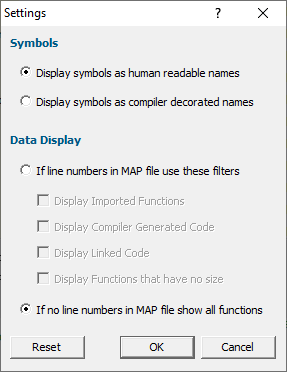
Symbols
Depending upon the task you are performing you may wish to read the symbols as human readable symbols or compiler decorated C++ symbols. We provide two radio boxes that allow you to choose how the symbol names are displayed.
Data Display
For MAP files that have line numbers you may wish to view additional information as well as the line numbers.
If line numbers in MAP file
Selecting If line numbers in MAP file... radio box will display all information relating to symbols that have line information.
Imported Functions
Functions imported from other DLLs will be displayed if you select the Display Imported Functions check box.
Compiler Generated Code
Compiler generated code will be displayed if you select the Display Compiler Generated Code check box.
Linked Code
Linked object code from .obj and .lib will be displayed if you select the Display Linked Code check box.
Functions that have no size
Symbols with no size will be displayed if you select the Display Functions that have no size check box.
If no line numbers in MAP file
Selecting If no line numbers in MAP file... radio box will display all information that was found in the MAP file.
Reset
You can reset the settings to their default state at any time by clicking Reset.
