The Session Already Loaded page allows you to control how Memory Validator behaves when you try to load a session that is already present in the Session Manager.
The default settings are shown below:
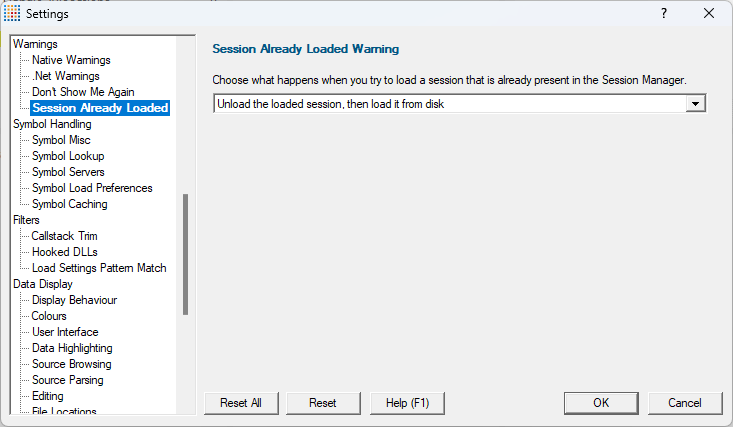
Sessions loaded into Memory Validator can be closed by many different actions:
•File Close  user manually closing the session
•Load Session user manually loading a session
•Launch launching any application (native, .Net, etc) from the Memory Validator user interface
•Inject injecting into any application from the Memory Validator user interface
•Wait for Application waiting for any application and injecting into it when it launches, from the Memory Validator user interface
•Command line Memory Validator launches an application from the command line
•Memory Validator started from the API any use of the API that starts Memory Validator
When a session is closed in this manner, the session remains loaded into the Session Manager, unless it is purged based on the Session Manager settings.
This allows sessions to be kept in memory so that they can be inspected later, or compared with a different session. This allows you to spot memory leak regressions, manually or automatically.
Because of this arrangement, it is possible that you may try to load a session that is already loaded into the session manager.
When this happens, you have a choice of actions, allowing you to customize Memory Validator's behaviour.
•Display the Session Already Loaded dialog display the Session Already Loaded dialog. This is equivalent to an improved version of the experience prior to October 2025.
•Display the Session Manager display the Session Manager.
•Display the loaded session display the session that is already in memory without loading it from disk.
•Unload the loaded session, then load it from disk this option unloads the session found in memory, the loads the session from disk.
This option is provided to allow you to be sure you have the session you want loaded - in case you have the same data in two differently named files.
Default behaviour
Prior to October 2025, the default behaviour was Display the Session Already Loaded dialog.
From October 2025, the default behaviour is Unload the loaded session, then load it from disk.
Reset All - Resets all global settings, not just those on the current page.
Reset - Resets the settings on the current page.
