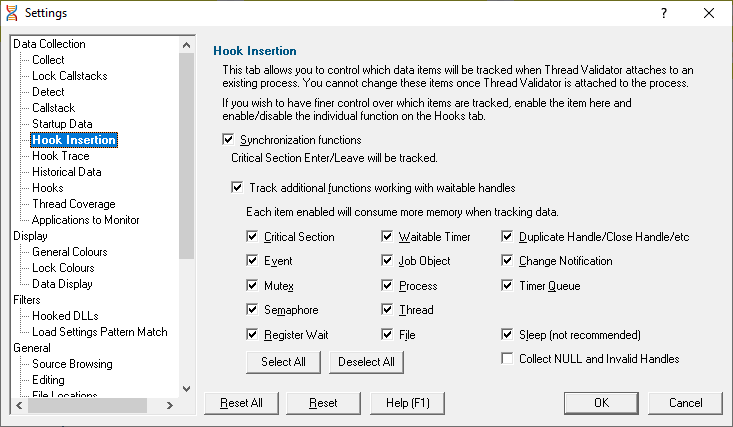
The Hook Insertion tab allows you to control which functions are monitored by Thread Validator.
Change hooks before a session
Before a session starts you can set which data items are hooked.
Hooking changes made mid session will come into effect on the next session, but you can enable or disable the data from installed hooks at any time using the hooks tab.
Hook Insertion
Two check boxes control which groups of hooks are inserted into your application.
•Synchronization functions  inserts hooks for tracking synchronization objects into the target program
If enabled, the default behaviour is that critical section enter and leave events will be tracked. Additional functions can then be specified below.
•Functions working with waitable handles hooks (below) for tracking functions that create, manage and destroy waitable handles will be inserted into the target program
A few additional functions (Sleep, and critical section related functions) are also monitored.
Specify which groups of functions should have data collected from them using the individual check boxes. (See note about memory below).
Any collected data can be viewed on the Active Objects and Analysis tabs.
Groups of items |
Functions that... |
•Critical Section |
initialize, modify and destroy |
•Event |
create, open and destroy |
•Mutex |
create, open and destroy |
•Semaphore |
create, open and destroy |
•Register Wait |
register and unregister |
•Waitable Timer |
create, open and destroy |
•Job Object |
create, open and destroy |
•Process |
create, open and destroy |
•Thread |
create, open and destroy |
•File |
create, open and destroy files (of any type) |
•Duplicate Handle |
miscellaneous handle functions |
•Change Notification |
create, open and destroy file change notifications |
•Timer Queue |
create, open and destroy timer queues and timer queue timers |
Other options:
•Sleep |
Sleep and SleepEx as various threads sleep from time to time.
|
•Collect NULL and Invalid Handles |
information about failed handle creation |
•Select/Deselect All switches all the above functions allocating waitable handles - i.e. not Sleep and invalid handles
 It's recommended that options in this section are only enabled if you need to monitor the data. If you subsequently find that memory consumption is very high, consider changing the settings here, or on the Historical Data tab.
Reset All - Resets all global settings, not just those on the current page.
Reset - Resets the settings on the current page.