The Symbol Servers tab allows you to specify Symbol Servers to retrieve symbols used in your application.
 You do not need to specify symbol servers if you do not wish to, and VM Validator will work correctly without them.
 Read on, or click on a setting in the picture below to find out more.
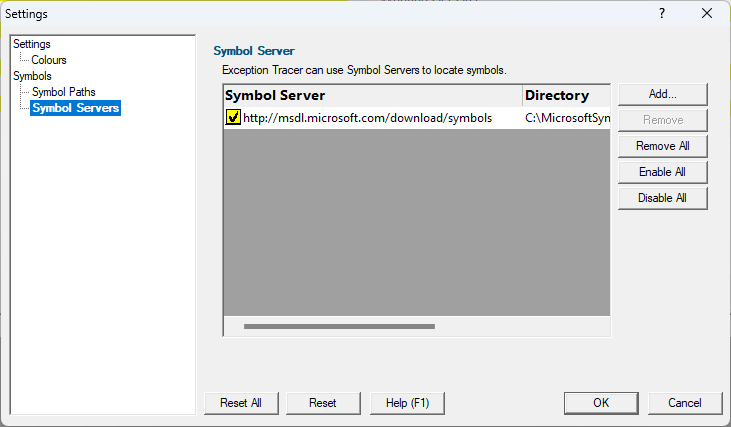
Symbol servers
Symbol servers are entirely optional, but are useful for obtaining symbols from a centralized company resource or for obtaining operating symbols from Microsoft.
The default symbol server is the Microsoft symbol server used for acquiring symbols about Microsoft's operating system DLLs. You may also wish to add some symbol servers for any software builds in your organisation.
A symbol server is defined by at least the following:
•the symbol server dll to be used to handle the symbol server interaction
•a directory location where symbol definitions are saved
•the server location - a url
Each symbol server can be enabled or disabled allowing you to keep multiple symbol server configurations available without constantly editing their definitions.
You can define up to four symbol servers and more than one can be enabled at a time.
Symbol Server Errors
Any symbol server entry shown in red indicates there is a problem with parts of the definition of that symbol server.
In the image shown above the symbol server at http://127.0.0.42:8000 cannot be reached. It is either offline or does not exist.
Managing symbol servers
•Add...  displays the symbol server dialog described below
•Remove remove selected symbol server(s) in the list
•Remove All remove all symbol servers
•Enable All enables all symbol servers in the list
•Disable All disables all symbol servers
You can also enable or disable an item in the list via the yellow check box at the left of each row.
To edit the details for a symbol server, just double click the entry in the list to show the symbol server dialog again.
The dialog initially appears pre-populated with some default values and allows you to set up or edit the definition of a symbol server. Some of the default values can be changed.
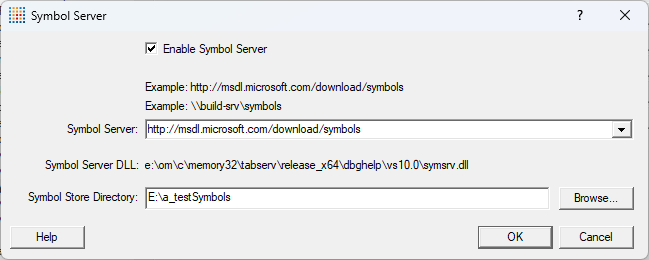
•Enable Symbol Server enable or disable this server
The following three entries must be set to enable the OK button and define the symbol server.
 OK button not enabled? The OK button will only be enabled when the following entries have a valid value:
- Symbol Server DLL names a dll present in the Memory Validator install directory.
- Symbol Store Directory has been specified and exists.
- Symbol Server URL has been specified (this value will not be checked for correctness).
•Symbol Server select a predefined public symbol server or enter the URL of the symbol server you wish to use - the Microsoft server is initially set as the default
•Symbol Store Directory enter or Browse to set the directory that will contain local copies of the downloaded symbols
The Symbol Server DLL is set chosen from the VM Validator directory, and then overridden by any matching DLLs found in the most recent Visual Studio installation that can be identified.
Reset All - Resets all global settings, not just those on the current page. This includes removing any symbol servers added.
Reset - Resets the settings on the current page. This includes removing any symbol servers added.
